The Benefits of Using a Dash Cam: Recording Accidents and Incidents
Why Every Driver Needs a Dash Cam Accident Recording and Peace of Mind
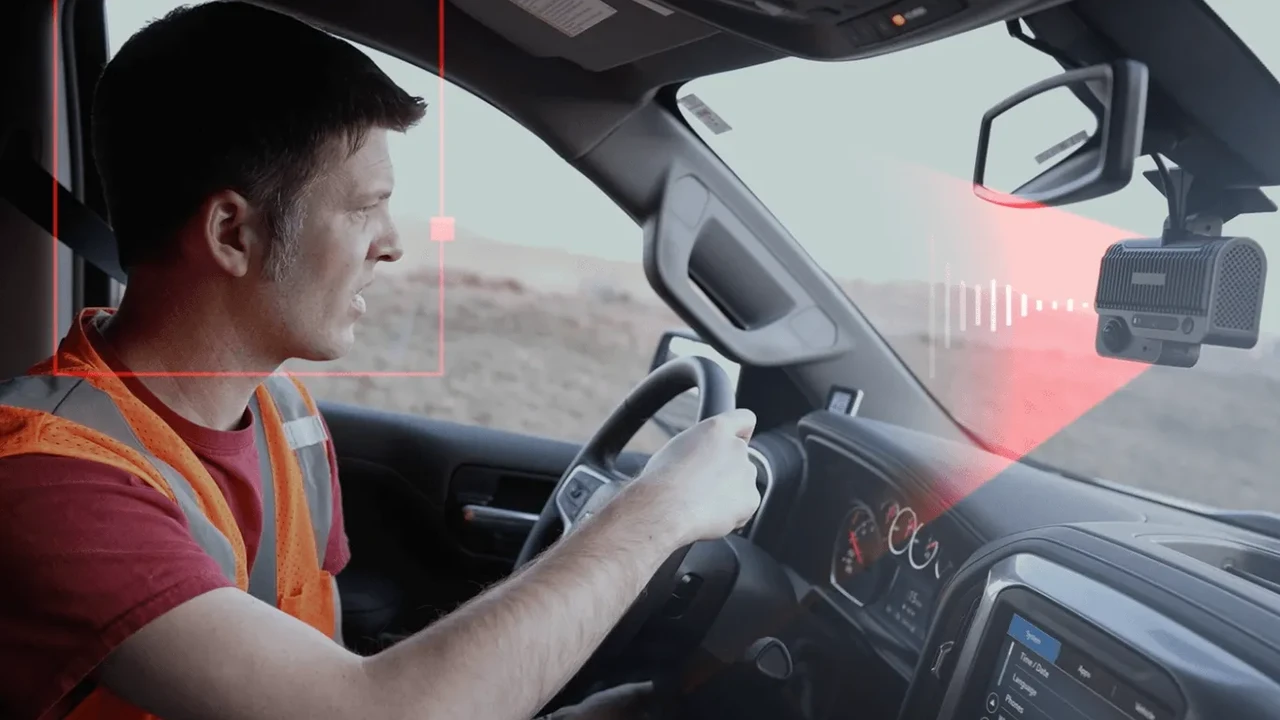
Okay, let's be real. Driving can be stressful. People cut you off, traffic jams are a nightmare, and the unexpected can happen in a split second. That's where a dash cam comes in. It's like having a silent, always-on witness riding shotgun, ready to record everything that happens on the road. Think of it as an insurance policy for your sanity and your wallet.
Dash Cam Benefits Recording Evidence Protecting Yourself From False Claims
The biggest benefit? Evidence. Imagine you're in an accident that's not your fault. The other driver might try to deny responsibility, or their insurance company might try to lowball you. But with a dash cam, you have concrete proof of what actually happened. No he-said-she-said, just cold, hard video evidence. This can be invaluable in settling insurance claims quickly and fairly, potentially saving you thousands of dollars and a whole lot of headaches.
Beyond accidents, dash cams can also protect you from false accusations. People sometimes try to scam insurance companies by staging accidents. With a dash cam, you have proof that the accident wasn't your fault and that the other party was trying to deceive you. It's a great way to protect yourself from fraud and legal trouble.
Dash Cam Features Loop Recording Parking Mode and G-Sensor Explained
So, what makes a good dash cam? Let's break down some key features:
- Loop Recording: This is a must-have. Dash cams record continuously, but they don't have unlimited storage. Loop recording means the camera overwrites the oldest footage with the newest, so you don't have to worry about running out of space.
- Parking Mode: This feature allows the dash cam to record even when your car is parked. If someone hits your car while you're away, the dash cam will automatically start recording, capturing the license plate and the incident. This is especially useful in parking lots.
- G-Sensor: This sensor detects sudden impacts or braking. When it detects an event, it automatically locks the footage, preventing it from being overwritten. This ensures that important footage is preserved.
Top Dash Cam Recommendations Budget Friendly Premium Options Reviewed
Alright, let's talk about some specific dash cams. Here are a few recommendations across different price points:
Budget-Friendly Options:
- Vantrue N1 Pro Mini Dash Cam: A great entry-level option. It's small, discreet, and records in 1080p. It has loop recording and a G-sensor. Around $50.
- Roav by Anker Dash Cam C1: Another affordable option with good image quality and a wide-angle lens. It also has Wi-Fi connectivity. Around $60.
Mid-Range Options:
- Thinkware F200 Pro: A reliable dash cam with front and rear recording. It has parking mode, loop recording, and a G-sensor. Excellent image quality, even at night. Around $150.
- Garmin Dash Cam 57: Easy to use and integrates well with other Garmin devices. Offers voice control and automatic incident detection. Around $170.
Premium Options:
- BlackVue DR900X-2CH: Top-of-the-line image quality (4K), cloud connectivity, and a sleek design. Offers comprehensive features like parking mode, remote live view, and impact detection. Around $500.
- Nextbase 622GW: Records in 4K and has built-in GPS, Wi-Fi, and emergency SOS features. It also has image stabilization for smoother footage. Around $400.
Dash Cam Usage Scenarios From Commuting to Road Trips Maximizing Safety
Dash cams aren't just for accidents. They can be useful in a variety of situations:
- Commuting: Document aggressive drivers, road hazards, and unexpected events during your daily commute.
- Road Trips: Capture scenic drives and create lasting memories of your adventures.
- Ride-Sharing: Protect yourself from false accusations or unruly passengers (check local regulations first).
- Teen Drivers: Monitor your teen's driving habits and provide valuable feedback.
Dash Cam Installation Tips Easy Setup and Optimal Placement
Installing a dash cam is usually pretty straightforward. Most dash cams come with a suction cup mount or an adhesive mount that attaches to your windshield. Here are a few tips:
- Placement: Position the dash cam in the center of your windshield, behind your rearview mirror. Make sure it doesn't obstruct your view of the road.
- Power: Most dash cams plug into your car's cigarette lighter socket. You can also hardwire the dash cam to your car's electrical system for a cleaner installation (this usually requires professional installation).
- Angle: Adjust the angle of the dash cam so that it captures the entire road in front of you.
Dash Cam Comparison Chart Key Features Price and Performance
Let's compare some of the dash cams mentioned above based on key features:
| Dash Cam Model | Resolution | Parking Mode | G-Sensor | Wi-Fi/GPS | Price (Approx.) |
|---|---|---|---|---|---|
| Vantrue N1 Pro Mini | 1080p | Yes | Yes | No | $50 |
| Roav by Anker C1 | 1080p | Yes | Yes | Yes | $60 |
| Thinkware F200 Pro | 1080p (Front & Rear) | Yes | Yes | Yes (Optional GPS) | $150 |
| Garmin Dash Cam 57 | 1440p | Yes (Parking Mode Cable Required) | Yes | Yes (GPS) | $170 |
| BlackVue DR900X-2CH | 4K (Front & Rear) | Yes | Yes | Yes (GPS, Cloud) | $500 |
| Nextbase 622GW | 4K | Yes | Yes | Yes (GPS, Wi-Fi) | $400 |
Dash Cam Maintenance Tips Keeping Your Device Running Smoothly
To keep your dash cam running smoothly, follow these tips:
- Format the SD card regularly: This will help prevent errors and ensure that the dash cam records reliably.
- Clean the lens: Use a soft, lint-free cloth to clean the lens regularly.
- Check the mount: Make sure the dash cam is securely mounted to your windshield.
- Update the firmware: Check the manufacturer's website for firmware updates. These updates can improve performance and add new features.
Dash Cam Legal Considerations Privacy Laws and Regulations
Before you install a dash cam, it's important to be aware of the legal considerations. Laws regarding dash cams vary by state and country. In some jurisdictions, you may be required to inform passengers that they are being recorded. It's also important to respect the privacy of others. Don't use your dash cam to record private conversations or activities without their consent. Always check your local laws and regulations before using a dash cam.
Dash Cam Alternatives Smartphone Apps and Their Limitations
While dedicated dash cams are generally the best option, you can also use your smartphone as a dash cam. There are several dash cam apps available for iOS and Android. However, smartphone apps have some limitations. They can drain your battery quickly, and they may not have the same features as dedicated dash cams, such as loop recording and parking mode. Plus, relying on your phone means you can't use it for navigation or other tasks while driving.
Dash Cam Future Trends AI Integration and Advanced Features
The future of dash cams is bright! We're seeing more and more dash cams with advanced features like AI integration, driver assistance systems (ADAS), and cloud connectivity. AI can be used to detect and analyze driving behavior, providing valuable insights for improving safety. ADAS features like lane departure warning and forward collision warning can help prevent accidents. And cloud connectivity allows you to access your footage from anywhere in the world.
Choosing the Right Dash Cam Factors to Consider Before Buying
So, how do you choose the right dash cam for your needs? Consider these factors:
- Budget: How much are you willing to spend?
- Features: What features are important to you? (e.g., resolution, parking mode, GPS)
- Reliability: Read reviews and choose a reputable brand.
- Ease of Use: Is the dash cam easy to install and operate?
Ultimately, the best dash cam is the one that meets your specific needs and budget. Do your research, read reviews, and choose a dash cam that will provide you with peace of mind on the road.
:max_bytes(150000):strip_icc()/277019-baked-pork-chops-with-cream-of-mushroom-soup-DDMFS-beauty-4x3-BG-7505-5762b731cf30447d9cbbbbbf387beafa.jpg)